FabFilter Pro-Q 3 Review: Is It Still the Best EQ Plugin in 2026?
TL;DR: FabFilter Pro-Q 3 remains the benchmark parametric EQ in 2026 — no competitor has matched its combination of surgical precision, dynamic EQ, mid/side processing, and workflow speed at the price. If you produce or mix at any serious level and are buying one EQ plugin, this is it. The Total Bundle is the smart move if you plan to add more FabFilter tools.
Quick Picks at a Glance
| Plugin | Price | Best For | Get It |
|---|---|---|---|
| FabFilter Pro-Q 3 | ~$179 | All-around mixing & mastering EQ | Plugin Boutique |
| FabFilter Total Bundle | ~$879 | Full FabFilter studio toolkit | Plugin Boutique |
| TDR Nova | Free / €49 | Budget-friendly dynamic EQ | — |
| DMG Audio EQuality | ~$99 | Analog-voiced precision EQ | — |
| iZotope Neutron | ~$249 | AI-assisted EQ with session integration | — |
Introduction
The FabFilter Pro-Q 3 review 2026 question keeps resurfacing for good reason: the EQ market has never been more competitive. iZotope has doubled down on AI-assisted mixing, DMG Audio keeps pushing analog authenticity, and free tools like TDR Nova have raised the quality floor high enough to challenge paid options that cost three figures. After years of challengers, the real question isn’t whether Pro-Q 3 is still good — it’s whether it’s still worth the premium over what you can get elsewhere.
For over a decade, Pro-Q 3 has been the default first EQ engineers reach for in a session, from bedroom producers tracking vocals to Grammy-winning mastering engineers shaping final mixes. That reputation wasn’t built on marketing. It was earned through a workflow so fluid it genuinely speeds up decisions, combined with a feature set deep enough to handle everything from gentle tonal shaping to aggressive surgical correction in a single plugin instance.
This guide covers every major feature, real-world use cases across genres, honest comparison against the strongest alternatives available right now, and a clear answer on whether it’s worth buying in 2026.
Deep Dive: FabFilter Pro-Q 3
FabFilter Pro-Q 3 — The Parametric EQ That Still Sets the Standard
- Developer: FabFilter
- Price: ~$179
- Platforms: Windows, macOS
- Formats: VST, VST3, AU, AAX
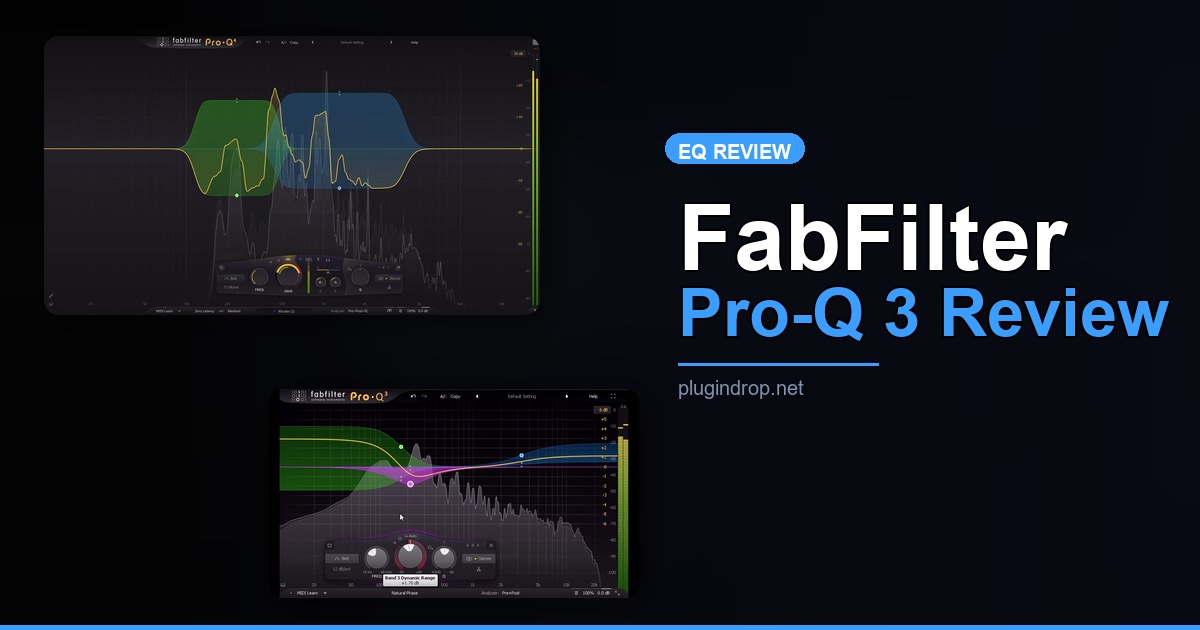
Pro-Q 3 supports up to 24 EQ bands with an exhaustive list of filter shapes: bell, high and low shelf, high-pass, low-pass, band-pass, notch, and tilt-shelf. Every band can be independently assigned to left/right or mid/side channels without any additional routing steps — a feature that used to require dedicated M/S plugins or complex DAW workarounds. The spectrum analyzer is one of the most readable in the industry: high resolution, low CPU overhead, and it can simultaneously display the spectrum from any other Pro-Q 3 instance open in your session for inter-track frequency management.
The dynamic EQ functionality is native, not bolted on. Each band can be switched to dynamic mode, where a built-in sidechain triggers gain changes based on incoming level — effectively a frequency-specific compressor or expander operating within your EQ. This alone eliminates the need for a dedicated dynamic EQ plugin in most mixing workflows, which changes the math on the price entirely.
Best for: Mixing engineers, mastering engineers, and producers who want one EQ plugin that handles everything from precise surgical correction to creative tonal shaping.
→ Get FabFilter Pro-Q 3 on Plugin Boutique
Feature Breakdown
The Interface: Why Workflow Efficiency Still Matters
FabFilter’s UI design philosophy is unchanged and still unmatched in its category. Bands are created by double-clicking on the spectrum display and dragged into position directly. Q, gain, and frequency adjust with modifier keys — no modal switching, no separate parameter panels to navigate. You are always inside the EQ itself, not hunting through menus. For engineers spending hours daily inside a single plugin, this responsiveness compounds into real time savings across a session.
The built-in Piano Roll display maps EQ band positions against musical notes, which is genuinely useful when targeting resonant fundamentals or harmonics by ear. Snap-to-note functionality makes harmonic EQing — increasingly standard in modern production — accessible without referencing frequency charts.
Three Processing Modes for Every Situation
Pro-Q 3 offers three distinct operating modes:
- Zero Latency: True minimum-phase processing with no added delay. Use this while tracking or on any channel where latency compensation matters.
- Natural Phase: A hybrid mode that reduces linear phase pre-ringing while maintaining better phase coherence than standard minimum phase. The best choice for bus and mix processing.
- Linear Phase: Zero phase shift across the frequency spectrum. The standard choice for mastering, where phase relationships between instruments are already embedded in the mix.
Switching between modes is a single click, the difference is audible on full mixes, and very few competitors offer this level of granularity.
Dynamic EQ: The Feature That Changes the Calculus
Each of Pro-Q 3’s 24 bands can operate in static or dynamic mode. In dynamic mode, you define a threshold, range, and attack/release — the band becomes a frequency-targeted compressor or expander. A 5 dB cut on a harsh 3 kHz resonance that only engages when a vocal pushes louder is cleaner and more transparent than a static notch sitting there all the time. Dynamic EQ was once the territory of dedicated plugins costing as much as Pro-Q 3 alone. Having it inside your primary EQ — already instantiated on every channel — removes friction and eliminates an extra plugin instance from the chain.
EQ Match and Spectrum Grab
The EQ Match feature analyzes the spectral difference between two audio signals and generates filter bands to match one to the other. It’s a practical tool for referencing a mix against a commercial track or matching tonality across multiple microphones on the same source. The results require editorial judgment — it generates a starting point, not a finished curve — but that starting point is often far closer than a blank slate.
Collision Detection Across the Session
Load Pro-Q 3 on multiple channels and enable spectrum display across instances. Each open instance can show the frequency content of any other Pro-Q 3 in the session simultaneously, with collision highlighting flagging where two tracks compete for the same frequency range. For engineers managing complex arrangements, this is one of the fastest methods available for identifying masking issues without switching between channel strips.
Real-World Use Cases
Vocals: Deploy narrow dynamic bands around 2–4 kHz to manage harshness only when the vocalist pushes harder. A gentle high-shelf boost in Natural Phase mode adds air without introducing phase smear on sibilants.
Kick and Bass Integration: Display the bass spectrum on the kick’s Pro-Q 3 instance and vice versa. Cut complementarily in the sub-to-low-mid range where kick and bass most commonly collide. Dynamic cuts on both channels keep low-end tight without pumping.
Mastering: Switch to Linear Phase mode and work in Mid/Side to address center buildup and stereo harshness independently. High-quality oversampling prevents aliasing at extreme gain settings.
Drum Bus: Natural Phase mode balances punch and phase coherence on transient-heavy material. Combine static shelves with dynamic mid-band processing to control bus tone without over-compressing transient character.
How Does It Compare to the Competition in 2026?
TDR Nova — Best Free Dynamic EQ Alternative
- Developer: Tokyo Dawn Records
- Price: Free (Nova GE: €49)
- Platforms: Windows, macOS
- Formats: VST, VST3, AU, AAX
TDR Nova is genuinely strong for a free plugin and the closest free alternative to Pro-Q 3’s dynamic EQ capability. It lacks Pro-Q 3’s band count, depth of M/S routing, inter-track spectrum display, linear phase mode, and EQ Match. For producers who need dynamic EQ without the investment, it covers the basics well.
Best for: Budget-conscious producers who need dynamic EQ functionality without committing to a paid plugin.
→ Get TDR Nova on Plugin Boutique
DMG Audio EQuality — Best for Analog-Voiced Precision
- Developer: DMG Audio
- Price: ~$99
- Platforms: Windows, macOS
- Formats: VST, VST3, AU, AAX
EQuality uses analog-modeled filter curves and has a dedicated following among engineers who prefer hardware-influenced processing character. It lacks native dynamic EQ but its filter shapes and CPU efficiency are both competitive. Pro-Q 3 wins on raw flexibility; EQuality is the choice if analog-voiced response matters more than feature breadth.
Best for: Engineers who specifically want analog filter character paired with strong CPU performance.
→ Get DMG Audio EQuality on Plugin Boutique
iZotope Neutron — Best for AI-Assisted Workflow
- Developer: iZotope
- Price: ~$249 (as part of the Neutron suite)
- Platforms: Windows, macOS
- Formats: VST3, AU, AAX
Neutron’s EQ module includes AI-generated band suggestions, session-level masking detection across multiple channels, and integrated transient shaping. It’s more expensive than Pro-Q 3 standalone, requires the full Neutron suite for maximum benefit, and the AI suggestions still need an experienced ear to validate. Pro-Q 3 remains faster and more responsive for manual precision work; Neutron is stronger if AI-assisted starting points integrated directly into the EQ itself suit your workflow.
Best for: Producers who want AI assistance baked into their EQ and are invested in iZotope’s ecosystem.
→ Get iZotope Neutron on Plugin Boutique
Worth Upgrading To (Paid Options)
FabFilter Pro-Q 3 — The Upgrade That Changes How You Mix
- Developer: FabFilter
- Price: ~$179
- Why upgrade: Stock DAW EQs and basic parametric tools lack dynamic EQ, mid/side processing per band, linear phase mode, and inter-track spectrum collision detection — the features in Pro-Q 3 that handle the most time-consuming mixing problems fastest. The workflow efficiency difference between a stock EQ and Pro-Q 3 is noticeable within the first session.
→ Get FabFilter Pro-Q 3 on Plugin Boutique
FabFilter Total Bundle — Best Value for Committed FabFilter Users
- Developer: FabFilter
- Price: ~$879
- Why upgrade: The Total Bundle includes every FabFilter plugin — Pro-Q 3, Pro-C 2 (compressor), Pro-L 2 (limiter), Pro-MB (multiband dynamics), Pro-R (reverb), Volcano 3 (filter), and more — at significantly reduced cost versus buying individually. If you plan to add two or more FabFilter tools over the next 12–18 months, the bundle price is the rational choice.
→ Get FabFilter Total Bundle on Plugin Boutique
Full Comparison Table
| Plugin | Price | Type | Highlights | CTA |
|---|---|---|---|---|
| FabFilter Pro-Q 3 | ~$179 | Parametric + Dynamic EQ | 24 bands, M/S, dynamic EQ, linear phase, collision detection | Plugin Boutique |
| FabFilter Total Bundle | ~$879 | Full plugin suite | Every FabFilter plugin, significant savings vs. individual | Plugin Boutique |
| TDR Nova | Free / €49 | Dynamic EQ | Solid free tier, dynamic EQ, limited M/S depth | — |
| DMG Audio EQuality | ~$99 | Analog-style parametric EQ | Analog filter character, CPU-efficient | — |
| iZotope Neutron | ~$249 | AI-assisted EQ | AI band suggestions, session-level masking detection | — |
How to Choose
- If you mix or master at any serious level, Pro-Q 3 is the correct answer. Its combination of features and workflow speed has no equal at the price point.
- If budget is the primary constraint, start with TDR Nova for free dynamic EQ — our best free EQ VST plugins guide covers TDR Nova and nine other zero-cost alternatives before you invest in Pro-Q 3. Upgrade to Pro-Q 3 when the workflow limitations become a bottleneck — they will.
- If analog filter character matters more than feature breadth, DMG Audio EQuality is worth auditing. It won’t replace Pro-Q 3’s capabilities but it’s a different sonic tool.
- If you’re already inside iZotope’s ecosystem, Neutron’s EQ is strong and the AI integration is useful for faster starting points. For standalone EQ precision, Pro-Q 3 remains the more capable and more responsive tool.
- If you’re building a full FabFilter chain over the next year, the Total Bundle is the financially smart choice from day one rather than incremental purchases.
FAQ
Is FabFilter Pro-Q 3 still worth buying in 2026? Yes. Despite stronger competition than at any previous point, Pro-Q 3 remains the most complete parametric EQ at its price. The dynamic EQ, linear phase mode, M/S per-band processing, and inter-track collision detection are all still best-in-class for what they contribute to daily workflow.
What did Pro-Q 3 add over Pro-Q 2? Pro-Q 3 introduced native per-band dynamic EQ with individual threshold, range, attack, and release controls; the Piano Roll display for note-based band placement; and the inter-track spectrum display showing frequency collisions from other Pro-Q 3 instances in real time. These are meaningful additions, not incremental polish.
Can Pro-Q 3 be used for mastering? Yes, and it’s a strong mastering EQ. Linear Phase mode eliminates phase shift across the frequency spectrum, which is the correct choice when phase relationships in the mix are already fixed. Mid/Side mode enables independent center and side channel processing, which is standard practice in professional mastering.
Is Pro-Q 3 CPU-intensive? Pro-Q 3 is widely regarded as efficient for the quality of processing it delivers. Zero Latency mode carries the lowest CPU load; Linear Phase mode with high band counts increases demand, as expected. On any modern machine, heavy sessions with multiple instances handle without issue.
Does FabFilter offer a free trial? Yes. FabFilter provides a fully functional 30-day trial of all plugins, including Pro-Q 3, directly from their website. Testing it in actual sessions before purchasing is strongly recommended.
Final Thoughts
FabFilter Pro-Q 3 doesn’t win in 2026 by coasting on its reputation — it wins because no competitor has delivered a better balance of precision, depth, and workflow speed at the price. Dynamic EQ, linear phase processing, per-band mid/side routing, and inter-track collision detection are all still best-in-class, and the interface remains the most efficient in the category for engineers doing real work under session time pressure. There are cheaper tools that cover specific needs and more expensive tools that add AI layers, but none have displaced Pro-Q 3 as the EQ that belongs on every channel strip.
Buy it standalone if you’re building selectively, or get the Total Bundle if you’re committed to FabFilter’s ecosystem.
→ Get FabFilter Pro-Q 3 on Plugin Boutique
This post contains affiliate links. We may earn a small commission at no extra cost to you.
Related Guides
- Best Free EQ VST Plugins 2026 (FabFilter Alternatives)
- FabFilter Pro-Q 3 vs iZotope Neutron: Which EQ Wins?
- Free Alternative to FabFilter Pro-Q 3
- Best EQ Plugins 2026: Top Options Ranked
- Best Mixing Plugins 2026: Full Production Suite
This post contains affiliate links. We may earn a small commission at no extra cost to you.