How to Master Music at Home: Step-by-Step with the Best Plugins (2026)
TL;DR: Mastering at home in 2026 is fully achievable with the right tools and the right sequencing. FabFilter Pro-Q 3 and Pro-L 2 form the most transparent, surgical two-plugin mastering chain that professional forums consistently validate, and Youlean Loudness Meter 2’s free tier handles streaming-compliant loudness analysis before you spend a dollar. If you want one plugin that handles everything, iZotope Ozone 11’s AI-assisted workflow is the most recommended all-in-one mastering suite for bedroom producers.
Quick Picks at a Glance
| Plugin | Price | Best For | Get It |
|---|---|---|---|
| Youlean Loudness Meter 2 | Free / Pro | LUFS metering & streaming targets | Download Free |
| FabFilter Pro-Q 3 | $179 | Surgical mastering EQ with dynamic EQ | FabFilter |
| FabFilter Pro-L 2 | $179 | Transparent multi-algorithm limiting | FabFilter |
| iZotope Ozone 11 | From $249 | All-in-one AI-assisted mastering suite | iZotope |
| FabFilter Total Bundle | From $899 | Complete FabFilter mastering + mixing suite | Plugin Boutique |
Introduction
Here is the misconception that wastes the most time for producers learning how to master music at home with VST plugins in 2026: loudness matching by ear is not mastering. Most bedroom producers who get stuck in revision loops are skipping the first step entirely — calibrated loudness measurement. Spotify normalizes to -14 LUFS integrated. Apple Music targets -16 LUFS. If you’re not measuring integrated LUFS and true peak before touching anything else, you’re not mastering — you’re guessing in the dark with expensive plugins.
The tooling gap between professional mastering suites and what’s available to bedroom producers has closed considerably. The same plugin names — FabFilter, iZotope — that appear in Gearspace’s mastering forums and KVR’s “what’s on your master bus” threads are accessible at consumer price points. The limiting factor in home mastering is no longer budget; it is sequencing and signal flow. Knowing which tool does which job, and in what order, is what separates a coherent home master from one that sounds processed but wrong.
This guide walks through the complete home mastering workflow as a step-by-step process, pairing each stage with the plugin most consistently recommended by producer communities for that specific job. It is written for producers who want to understand the reasoning behind each plugin choice — not just a list of names. Whether you are mastering electronic music, hip-hop, or acoustic recordings, the tools and process below apply directly.
Step 1: Loudness Analysis and Metering
Before a single EQ band or limiter knob is touched, a calibrated loudness meter needs to be running. Metering is not optional pre-processing — it is the reference system that makes every subsequent decision objective rather than approximate.
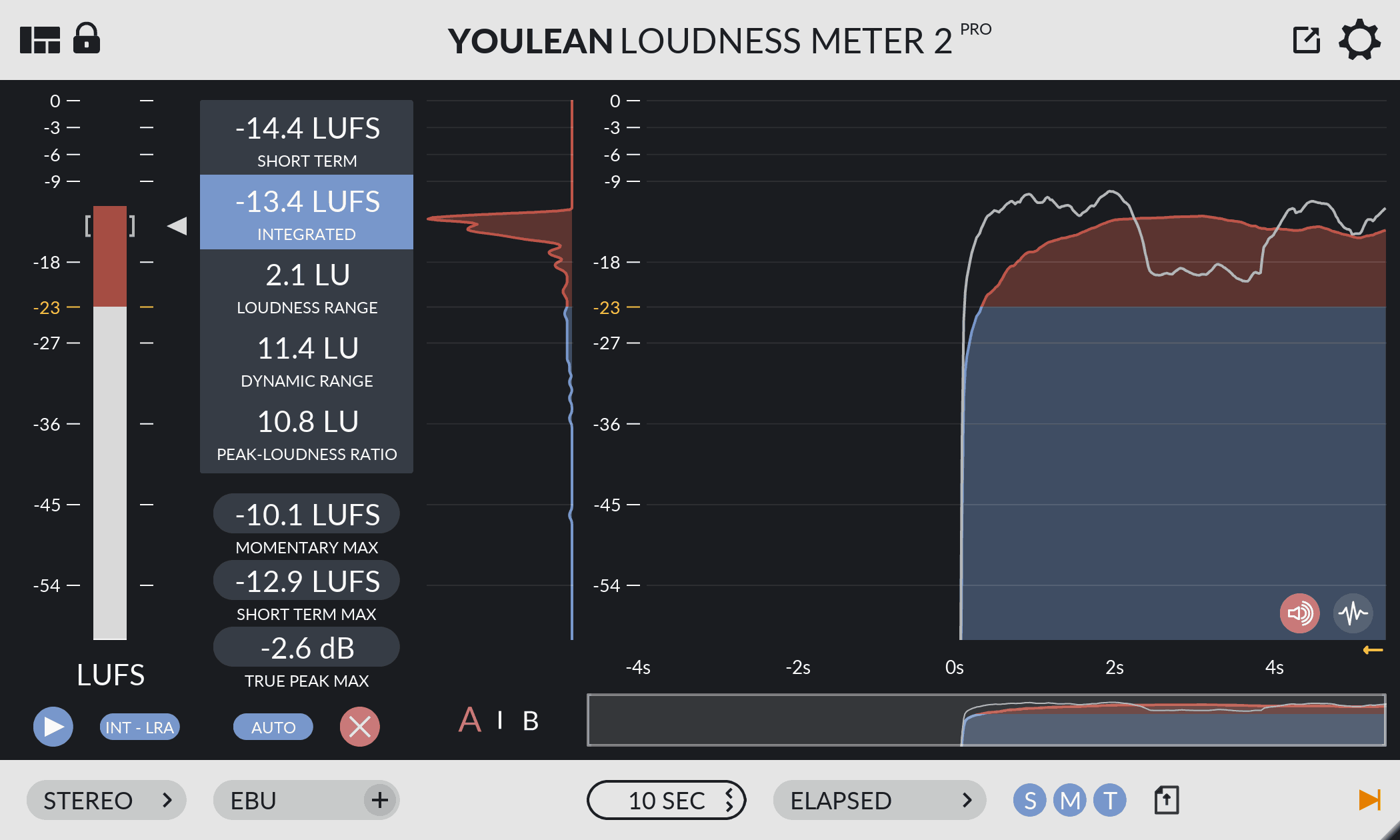
Youlean Loudness Meter 2 — The free LUFS metering standard for streaming-compliant home masters
- Developer: Youlean
- Price: Free (Pro version available)
- Platforms: Windows, macOS
- Formats: VST, VST3, AU, AAX, Standalone
Youlean Loudness Meter 2’s free tier provides integrated LUFS, short-term LUFS, momentary LUFS, loudness range (LRA), and true peak measurement — every metric streaming platforms use for normalization decisions. The interface displays preset targets for Spotify, Apple Music, YouTube, and other major platforms directly in the plugin window, so there is no cross-referencing external spec sheets mid-session. r/audioengineering consistently recommends it as the first free mastering tool producers should install, specifically because the integrated LUFS readout is unambiguous and true peak metering surfaces inter-sample clipping that would otherwise only appear during lossy file encoding.
The free version covers the full metering workflow for most home mastering use cases. The Pro tier adds extended export and batch analysis features for producers running larger sessions.
Best for: Every producer who needs accurate streaming-compliant loudness metering before their mastering chain.
→ Download Youlean Loudness Meter 2 Free
Step 2: Mastering EQ
Mastering EQ operates at a different scale than mixing EQ. Moves are smaller — often under 1 dB — and affect the entire stereo mix simultaneously. The tool needs to be more precise, more transparent, and more capable than anything used on an individual track.
FabFilter Pro-Q 3 — The most consistently recommended surgical EQ in mastering workflows
- Developer: FabFilter
- Price: $179
- Platforms: Windows, macOS
- Formats: VST, VST3, AU, AAX
FabFilter Pro-Q 3’s developer documentation confirms support for up to 24 EQ bands with a choice between zero-latency and linear phase processing modes — linear phase being the critical option for mastering applications where phase coherence across the stereo image is non-negotiable. The dynamic EQ mode allows individual bands to respond to transient content rather than applying static correction, which Gearspace’s mastering sub-forum cites repeatedly as a tool for taming resonances that only activate under loud passages without touching the surrounding frequency material.
Mid/side processing is implemented at the band level: different EQ curves can be applied independently to the center and sides of the stereo field. This allows, for example, a high-pass filter on the side signal to tighten low-end mono focus without affecting the center. The developer-confirmed inter-plugin spectrum analysis feature — which allows two instances of Pro-Q 3 to display their frequency content simultaneously for reference track comparison — directly addresses one of the most common home mastering problems: spectral guesswork without an external reference. KVR’s community lists it consistently among the top two or three EQs in any serious mastering context, across threads covering both budget and no-budget workflows.
Best for: Producers who need precision surgical EQ with dynamic capabilities, M/S processing, and a transparent character.
Step 3: Limiting and Final Output
The limiter sits at the end of the chain. Its job is to set the output ceiling, manage peak transients, and bring the master to its target loudness without audible artifacts. A poor limiter choice — or correct limiter set incorrectly — is the most common single point of failure in home mastering.
FabFilter Pro-L 2 — Eight limiting algorithms covering every genre and loudness target
- Developer: FabFilter
- Price: $179
- Platforms: Windows, macOS
- Formats: VST, VST3, AU, AAX
FabFilter Pro-L 2’s developer documentation lists eight distinct limiting algorithms: Transparent, Aggressive, Bus, Dynamic, Allround, Safe, Smooth, and Surgical. Each applies a different gain reduction approach, allowing producers to match the limiter’s character to the material — Transparent for acoustic and orchestral content, Aggressive for electronic and hip-hop where loudness density matters, Dynamic for material where transient retention is a priority. This algorithm variety is the reason Gearspace mastering threads consistently use Pro-L 2 as the benchmark when evaluating other limiters: it serves as its own reference point across genres.
The developer-confirmed ISP (inter-sample peak) metering and true peak limiting are the features that make it specifically relevant for streaming delivery. Inter-sample peaks — overloads that only appear during codec encoding, not in the DAW’s own output — are one of the most common causes of distortion that passes audibility checks in the session but fails on streaming platforms. Pro-L 2’s lookahead and release controls are granular enough to dial in exact transient behavior, which distinguishes it from one-knob mastering limiters at lower price points.
Best for: Any genre. The eight-algorithm architecture makes it the most versatile limiter at this price point.
Step 4: All-in-One Mastering Suite
For producers who want a guided workflow rather than coordinating multiple individual plugins, an all-in-one mastering suite integrates EQ, dynamics, imaging, and limiting into a single coherent interface. The trade-off versus dedicated plugins is less per-module granularity in exchange for a streamlined, AI-assisted process.
iZotope Ozone 11 — The most-recommended AI-assisted mastering suite for bedroom producers
- Developer: iZotope
- Price: From $249 (Standard); from $499 (Advanced)
- Platforms: Windows, macOS
- Formats: VST3, AU, AAX
Ozone 11 includes an EQ, dynamics module, imager, exciter, and maximizer within a single mastering-oriented interface. The developer-documented Master Assistant feature analyzes incoming audio and generates a starting preset based on target loudness, genre selection, and optionally a reference track — a feature that r/edmproduction and r/makinghiphop communities regularly cite as useful for establishing a working foundation before manual refinement. This is particularly valuable for producers learning mastering signal flow, since the generated preset also serves as a legible example of how each module interacts.
The Advanced tier adds two developer-confirmed features that address common home mastering limitations: Master Rebalance (which applies stem-level adjustments — drums, bass, vocals — to an already-mixed stereo file) and Low End Focus (a mid/side tool for shaping bass behavior across mono and stereo fields separately). Community consensus across producer forums is consistent — Ozone 11 is the most accessible and comprehensive all-in-one suite at its price point. It does not match the per-module precision of dedicated FabFilter plugins, but it offers a workflow coherence that many bedroom producers find more immediately productive, particularly when learning the fundamentals of mastering for the first time.
Best for: Producers who want a guided all-in-one mastering workflow with AI-assisted starting points and minimal plugin-coordination overhead.
Worth Upgrading To
iZotope Ozone 11 — Full-suite mastering with AI assistance and Master Rebalance
- Developer: iZotope
- Price: From $249
- Why upgrade: Entry-level and free mastering tools handle metering and basic limiting, but they require producers to manually coordinate every stage of the mastering chain. Ozone 11 integrates the complete signal flow — EQ, dynamics, imaging, limiting — into one interface with Master Assistant analysis and reference track matching. The Advanced tier’s Master Rebalance capability, which allows stem-level corrections on a final mix, is a developer-documented feature with no free equivalent.
FabFilter Total Bundle — Every FabFilter plugin in a single purchase
- Developer: FabFilter
- Price: From $899
- Why upgrade: Purchasing Pro-Q 3 and Pro-L 2 individually totals approximately $358. The Total Bundle extends that investment to include Pro-C 2 (compressor), Pro-MB (multiband dynamics), Pro-DS (de-esser), Saturn 2 (saturation and distortion), and the complete FabFilter effects suite. For producers who will apply FabFilter tools across both mastering and mixing — which is the typical progression once the mastering workflow is established — the bundle is the documented value purchase.
→ Get FabFilter Total Bundle on Plugin Boutique
Full Comparison Table
| Plugin | Price | Type | Key Highlights | Get It |
|---|---|---|---|---|
| Youlean Loudness Meter 2 | Free / Pro | Metering | Integrated LUFS, LRA, true peak, streaming platform presets | Download Free |
| FabFilter Pro-Q 3 | $179 | Mastering EQ | 24 bands, dynamic EQ, M/S per-band, linear phase, inter-plugin spectrum analysis | Buy |
| FabFilter Pro-L 2 | $179 | Limiter | 8 algorithms, ISP metering, true peak limiting, granular lookahead/release | Buy |
| iZotope Ozone 11 Standard | From $249 | All-in-one suite | EQ, dynamics, imager, maximizer, Master Assistant AI | Buy |
| iZotope Ozone 11 Advanced | From $499 | All-in-one suite | All Standard features + Master Rebalance, Low End Focus | Buy |
| FabFilter Total Bundle | From $899 | Full plugin suite | Pro-Q 3, Pro-L 2, Pro-C 2, Pro-MB, Pro-DS, Saturn 2, and more | Buy |
How to Choose
- If you have zero budget: Install Youlean Loudness Meter 2’s free tier first. Understanding integrated LUFS and true peak before anything else is the highest-return investment in home mastering — it makes every subsequent decision measurable.
- If you want maximum transparency and per-stage control: FabFilter Pro-Q 3 + Pro-L 2 is the combination Gearspace mastering discussions cite most consistently. Each plugin handles one job with documented precision, and neither adds color you have not explicitly dialed in.
- If you are learning mastering for the first time: iZotope Ozone 11 Standard is the correct entry point. The Master Assistant feature gives you an informed starting point, and the integrated interface makes the mastering signal flow legible before you graduate to individual plugins.
- If you’re mastering specifically for streaming platforms: Pair Youlean Loudness Meter 2 (free) with FabFilter Pro-L 2. Youlean’s streaming presets and Pro-L 2’s true peak limiting together address every streaming compliance requirement currently documented by major platforms.
- If you want to cover both mastering and mixing with one investment: The FabFilter Total Bundle’s documented value calculation makes sense once Pro-C 2 and Pro-MB for mixing duties factor in alongside the mastering tools — buying both plugins individually gets you most of the way to the bundle’s price.
FAQ
What LUFS target should I hit for Spotify and Apple Music in 2026? Spotify’s documented normalization target is -14 LUFS integrated. Apple Music targets -16 LUFS integrated. Tracks louder than the platform target are turned down; quieter tracks are turned up. The widely-documented best practice across r/audioengineering is to target -14 LUFS integrated with a true peak ceiling of -1 dBTP, which covers Spotify compliance without sacrificing audible loudness.
Can I use iZotope Ozone 11 and FabFilter Pro-L 2 in the same chain? Yes, and this is a documented workflow pattern in producer communities. A common configuration uses Ozone 11’s EQ, dynamics, and imager modules for the body of the mastering chain, then bypasses Ozone’s maximizer and feeds the output into FabFilter Pro-L 2 as the final limiter stage. This combines Ozone’s guided mid-chain processing with Pro-L 2’s algorithm variety at the output stage.
What’s the difference between integrated LUFS and short-term LUFS? Integrated LUFS measures average loudness across the entire track duration — this is the value streaming platforms use for normalization decisions. Short-term LUFS measures loudness across a rolling three-second window, giving real-time feedback during playback. Youlean Loudness Meter 2 displays both simultaneously, which its developer documentation identifies as a core feature of the plugin’s interface design.
Is FabFilter Pro-Q 3 better than iZotope Ozone 11’s EQ module? These serve different workflows rather than competing directly. Pro-Q 3 is a dedicated EQ with more band precision, dynamic EQ mode, and the inter-plugin spectrum analysis feature. Ozone 11’s EQ module is designed for integrated operation within the Ozone mastering workflow, with the Master Assistant able to inform its settings. Producer communities generally describe Pro-Q 3 as offering more surgical per-band control, while Ozone’s EQ is more contextually useful within the all-in-one environment.
Do I need acoustic treatment to master at home? Room treatment affects how accurately you hear what you’re doing, but several tools reduce its impact. Relying on Youlean’s LUFS metering makes loudness decisions objective. Using FabFilter Pro-Q 3’s spectrum analyzer with a reference track loaded in a second instance gives you a spectral comparison that doesn’t depend on room accuracy. Cross-checking on calibrated headphones alongside monitors is a documented practice in home mastering communities for exactly this reason.
Related Guides
- The Complete Mastering Plugin Chain: 6 Plugins for a Pro Master (2026)
- 12 Best Free Compressor VST Plugins in 2026 (Every Style Covered)
- 10 Best Free EQ VST Plugins in 2026 (Mixing & Mastering)
- 10 Best Free Delay VST Plugins in 2026 (Tape, Digital, Multi-tap)
- 12 Best Free VST Plugins for Ableton Live in 2026
Final Thoughts
The home mastering toolkit in 2026 does not require a professional studio budget to be functional. Youlean Loudness Meter 2’s free tier covers streaming compliance measurement immediately, and FabFilter Pro-Q 3 + Pro-L 2 form the two-plugin mastering chain that producer communities have validated over years of documented use. If a guided all-in-one workflow is what you need right now, iZotope Ozone 11 remains the most comprehensive and accessible mastering suite at its price point for bedroom producers — and the best entry point before advancing to individual plugin chains.
→ Get iZotope Ozone 11 for the all-in-one path, or start the modular chain with → FabFilter Pro-L 2 as your first dedicated mastering investment.
This post contains affiliate links. We may earn a small commission at no extra cost to you.
This post contains affiliate links. We may earn a small commission at no extra cost to you.