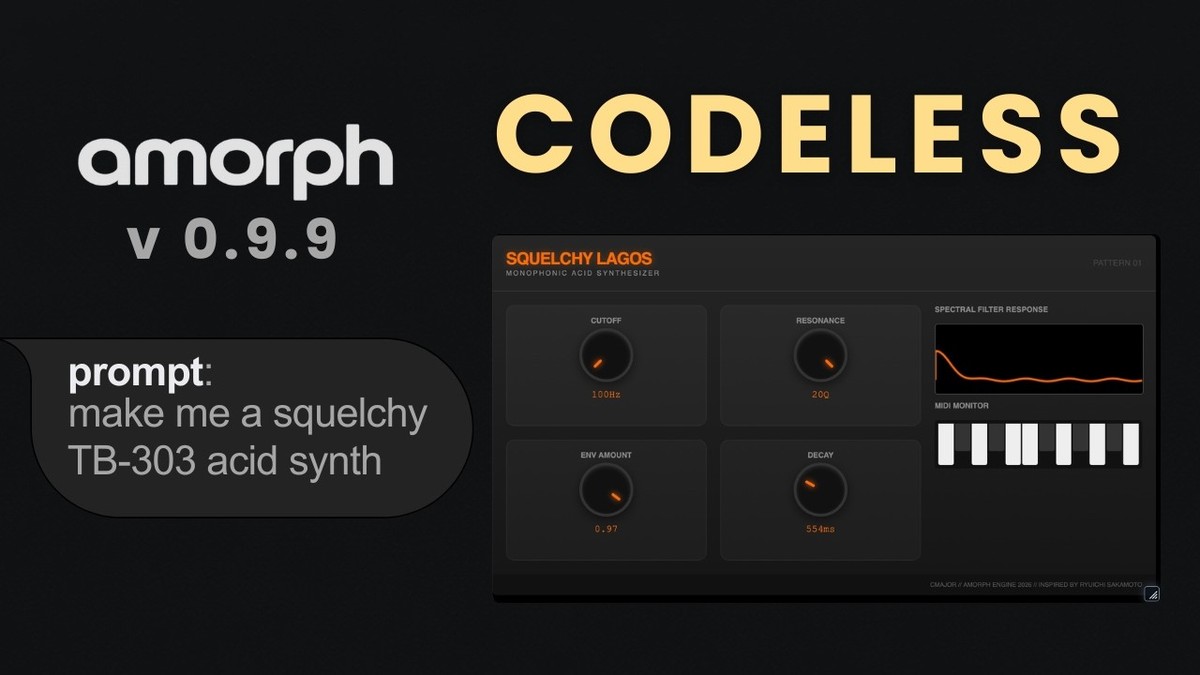
Amorph text-to-DSP plugin gets custom user interfaces & MIDI plugin generation
TL;DR: Amorph by Artists in DSP just leveled up — Beta v0.9.9 brings a custom UI engine, a brand-new MIDI plugin variant, and a cloud-based preset hub. The best part? It’s still completely free (pay-what-you-like). Grab it here.
What Is Amorph?
Amorph is a text-to-DSP plugin from Artists in DSP that lets you generate fully working audio instruments and effects inside your DAW using text prompts and the Cmajor programming language. The workflow is simple: ask an LLM (like ChatGPT or Gemini) to write DSP code based on your idea, paste it into Amorph, and it compiles into a playable plugin with a generated interface. It ships as two separate plugins — Amorph Instrument (synths, drones, noise generators) and Amorph Effect (reverbs, delays, distortion, filters) — in VST3 and AU formats for Windows and macOS.
Key Features in the v0.9.9 Update
- Custom UI Engine — Design your own graphical interfaces for generated patches using HTML/JS. Think custom visualizers, boutique-style knobs, and fully branded layouts instead of generic auto-generated controls.
- Amorph MIDI — A third plugin variant that accepts MIDI input and outputs MIDI. Build custom arpeggiators, sequencers, and complex MIDI logic tools from text prompts.
- The Hub — A new cloud-based preset browser built right into the plugin. Browse and download patches directly, with community sharing features planned for future updates.
- Sample-Accurate MIDI Timing — Tighter MIDI performance across the board.
- Fixed Parameter Recall — Reliable parameter state recall across all DAWs.
- Algorithm + Parameter Presets — Save entire custom devices or just parameter snapshots independently.
What Producers Are Saying
Amorph is still relatively new — it entered open beta in early 2026 — so the community conversation is building. Early discussions have appeared on KVR, Gearspace, and music production blogs. The general buzz centers on the concept itself: a free tool that democratizes audio plugin creation for producers who don’t code. Check those threads for first-hand impressions as the beta matures.
Who Is It For?
- Sound designers and experimenters — Anyone who wants to prototype unique effects and instruments without writing code from scratch.
- MIDI tool builders — The new Amorph MIDI variant is designed for producers who want custom arpeggiators, sequencers, or generative MIDI utilities.
- Producers learning DSP — Amorph’s compile-and-play loop makes it a hands-on way to explore audio programming concepts using Cmajor.
- Budget-conscious creators — At a pay-what-you-like price (including free), the barrier to entry is zero.
Pricing & Deal Details
| Regular Price | Deal Price | You Save |
|---|---|---|
| Pay what you like | Free | Everything |
Amorph uses a pay-what-you-like model on Gumroad, meaning you can download it for $0 or contribute whatever you choose. There’s no coupon code needed and no time-limited sale — this is the standard pricing model during the open beta.
Verify current pricing on the product page — terms can change as the plugin exits beta.
Get Amorph free on the product page.
Alternatives at a Glance
| Name | Price | Key Difference |
|---|---|---|
| FAUST IDE | Free | Open-source DSP language with a web IDE — more manual coding, no AI-assisted prompt workflow |
| Reaktor 6 (Native Instruments) | Check current pricing | Visual patching environment for building instruments/effects — no text-to-DSP, but deep modular design |
| Plugdata | Free | Visual programming environment based on Pure Data — node-based rather than text-prompt-based |
If you want a fully code-free visual approach, Plugdata or Reaktor offer drag-and-connect workflows. If you prefer describing what you want in plain text and letting AI handle the code, Amorph is the only option currently built around that concept.
FAQ
Q: Is Amorph really free? A: Yes. It uses a pay-what-you-like model on Gumroad during the open beta, and $0 is a valid option.
Q: What plugin formats does Amorph support? A: VST3 and AU on Windows and macOS.
Q: Do I need to know how to code to use Amorph? A: No. The intended workflow is to use an external LLM (like ChatGPT or Gemini) to generate Cmajor code from your text description, then paste it into Amorph. The plugin handles compilation and UI generation.
Q: What is the Amorph MIDI plugin? A: It’s a new third variant introduced in v0.9.9 that processes MIDI input and outputs MIDI, letting you create custom arpeggiators, sequencers, and MIDI logic tools via text prompts.
Get the Deal
A free plugin that turns text prompts into working instruments, effects, and now MIDI tools — with custom UI design on top. Hard to beat that price.
Download Amorph from Artists in DSP.
This post contains affiliate links. We may earn a small commission at no extra cost to you.
Related Guides
This post contains affiliate links. We may earn a small commission at no extra cost to you.