Topos saturation & amp effect plugin: Features, Pricing & Is It Worth It? (2026)
Topos saturation & amp effect plugin is available at Plugin Boutique. Check the current price here.
What Is Topos?
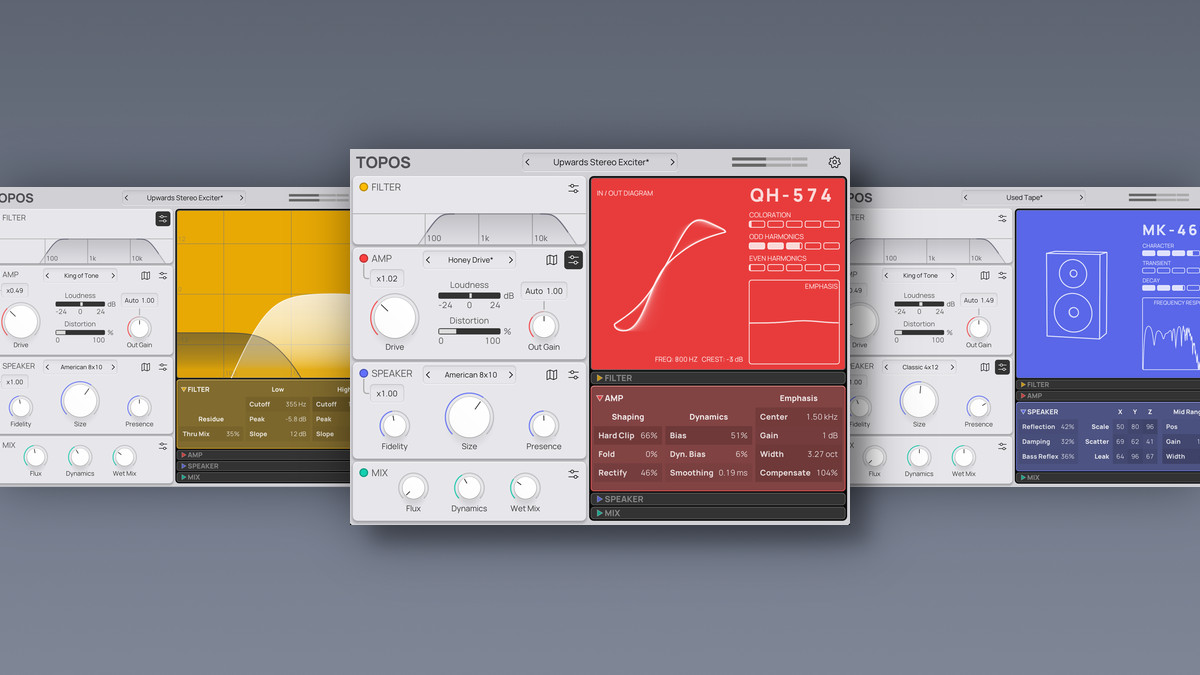
Topos is a saturation, amp simulation, and speaker modeling plugin developed by Forever 89. Rather than a traditional preset-based approach, it’s built around a pair of interactive “Map Views” — one for the amp section, one for the speaker section — that let you visually morph between different tonal characters by dragging a point across a 2D space. The idea is topographical tone exploration: blend between classic hardware voicings instead of toggling through static presets. It’s available in VST3 and AU formats (64-bit).
Key Features
- 35 Saturation Models — Covers vintage tube amps, distortion pedals, tape machines, and classic preamps in a single plugin.
- Interactive Map Views — Two visual maps (Amp and Speaker) allow seamless morphing between multiple models, making it fast to audition and blend tones.
- Speaker Simulation Section — Shape tone and perceived space with Fidelity, Size, and Presence controls for detailed speaker design.
- Input Filter — Low/high-pass filtering with adjustable slopes to tailor the tonal range before it hits the amp stage.
- Output Stage Controls — Flux and Dynamics parameters for tightening transients and smoothing peaks after amplification.
- Zero-Latency Processing — CPU-friendly, anti-aliased processing designed for real-time use without system strain.
What Producers Are Saying
Topos has been generating positive buzz since its release. On the KVR Audio forums, users frequently mention the speed of dialing in usable distortion tones compared to traditional saturation plugins. The interactive map interface is commonly highlighted as a standout feature. KVR reviewers have described it as lightweight, CPU-friendly, and easy to use, with a range from subtle warmth to aggressive drive.
Worth noting: Forever 89 also offers Topos: Play, a free version with a reduced feature set — a good way to test the workflow before committing to the full version.
Who Is It For?
- Mix Engineers — Designed for adding harmonic saturation and tonal color across individual tracks or buses during mixing.
- Sound Designers — The morphable amp and speaker maps open up creative territory for designing unique textures and tones.
- Guitar & Bass Producers — 35 amp and pedal models in one plugin covers a wide range of driven tones for instrument tracking.
- Producers on a CPU Budget — Zero-latency, anti-aliased processing means it can run on multiple tracks without choking your session.
If you’ve been on the fence, this is a stronger entry point than previous promotions.
Verify current pricing on the product page — deals can change. Check the deal at Plugin Boutique.
Alternatives at a Glance
| Name | Price | Key Difference |
|---|---|---|
| FabFilter Saturn 2 | $154 | Multi-band saturation with per-band modulation; more surgical, higher price point |
| Soundtoys Decapitator | $99 | Analog modeled saturation with 5 hardware styles; no speaker simulation |
| Topos: Play (Free) | $0 | Stripped-down version of Topos itself; fewer models and controls, but same core workflow |
If you want multi-band saturation control with deep modulation, Saturn 2 covers that territory at a higher price. If you’re after a straightforward analog saturation character without speaker modeling, Decapitator is a well-known option. If you want to test the Topos workflow first, the free Play version lets you do exactly that before upgrading.
FAQ
Q: What plugin formats does Topos support? A: Topos is available as VST3 and AU (64-bit). There is no VST2 or AAX version listed — check the official product page for the latest format support.
Q: Is there a free version of Topos? A: Yes. Forever 89 offers Topos: Play as a free download with a reduced feature set. It uses the same core interface but with fewer models and controls.
Q: What are the system requirements? A: The plugin is described as CPU-friendly with zero-latency processing. For specific OS versions, RAM, and CPU requirements, check the Forever 89 product page.
Q: Can I try before I buy? A: Downloading the free Topos: Play version is the best way to test the workflow. For refund policies on the paid version, check Plugin Boutique’s terms.
Where to Buy
If saturation, amp modeling, and speaker simulation in a single streamlined interface sounds like your lane, this is a solid time to jump in.
Check the current price at Plugin Boutique.
This post contains affiliate links. We may earn a small commission at no extra cost to you.
This post contains affiliate links. We may earn a small commission at no extra cost to you.