12 Best Free Vocal VST Plugins in 2026, Ranked (Tuning, Compression, Effects)
TL;DR: MAutoPitch is the top free pitch correction pick in 2026 — transparent, CPU-light, and stable across every major DAW. Pair it with Analog Obsession CHANNELSTRIP and TAL-Reverb-4, and you have a professional-grade vocal chain that costs exactly $0.
Quick Picks at a Glance
| Plugin | Price | Best For | Get It |
|---|---|---|---|
| MAutoPitch | Free | Transparent pitch correction | Plugin Boutique |
| Graillon 2 | Free | Creative pitch effects & robot vocals | Plugin Boutique |
| Analog Obsession CHANNELSTRIP | Free | Analog EQ + compression in one slot | Plugin Boutique |
| TAL-Reverb-4 | Free | Warm vintage plate reverb | Plugin Boutique |
| Wider (Polyverse) | Free | Mono-safe stereo widening | Plugin Boutique |
| Valhalla Supermassive | Free | Large ambient reverb and delay | Free Download |
| Klanghelm MJUC jr | Free | Vintage vari-mu tube compression | Free Download |
Introduction
Finding the best free vocal VST plugins in 2026 is no longer a compromise — it’s a legitimate production strategy. The tools available today from developers like MeldaProduction, TAL Software, and Valhalla DSP rival commercial vocal processors that cost hundreds of dollars, and many are actively updated, rock-solid in modern hosts, and trusted by working engineers.
The problem isn’t a lack of options. A search for free vocal plugins returns thousands of results, many of which are abandoned, unstable on macOS Sonoma or Windows 11, or simply not competitive with paid alternatives. Sorting through them wastes time that should be spent making music.
This guide covers 12 free vocal VST plugins that are worth installing in 2026 — tested for stability, sound quality, and real-world usability across the full vocal chain. You’ll find options for pitch correction, compression, EQ, de-essing, reverb, stereo width, doubling, and saturation, plus three paid upgrades for when your sessions demand more.
Pitch Correction & Tuning
MAutoPitch — The Transparent Free Autotune Standard
- Developer: MeldaProduction
- Price: Free
- Platforms: Windows, macOS
- Formats: VST, VST3, AU, AAX
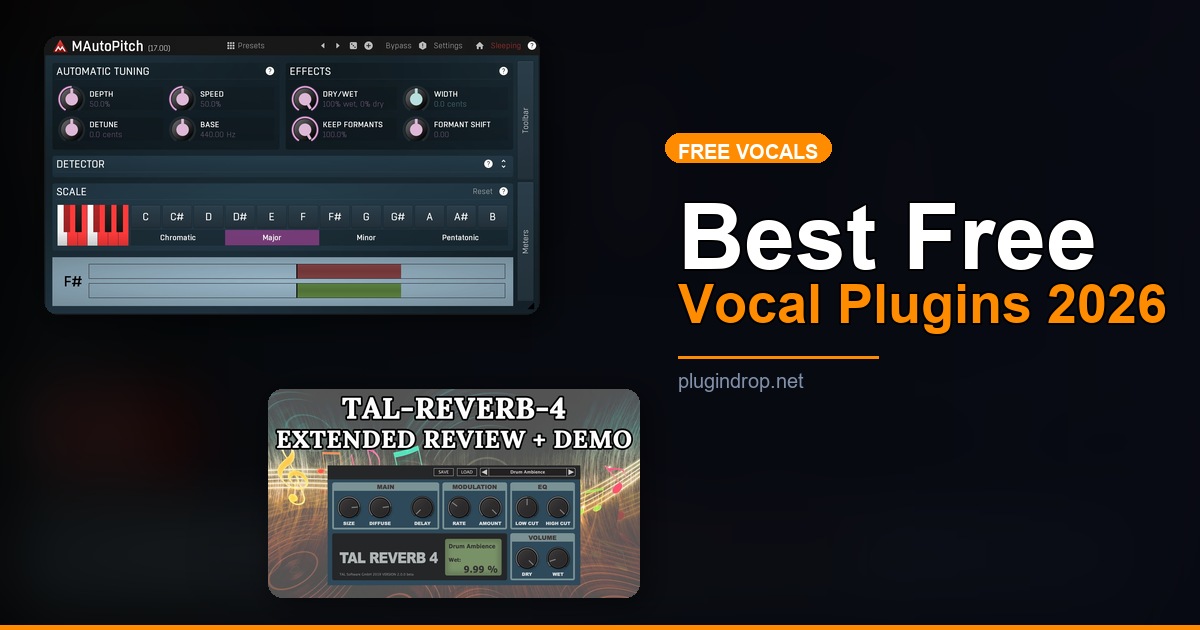
MAutoPitch handles both natural-sounding correction and hard, locked T-Pain-style autotune with equal competence. Key and scale detection is reliable, latency is minimal, and it behaves consistently across Ableton, FL Studio, Logic, and Reaper. For producers who want transparent pitch fixing without opening their wallet, this remains the benchmark free autotune plugin.
Best for: Subtle pitch correction on lead vocals and backing harmonies without audible artifacts.
→ Get MAutoPitch on Plugin Boutique → Download MAutoPitch Free
Graillon 2 — Pitch Shifting and Robotic Vocal Effects Done Right
- Developer: Auburn Sounds
- Price: Free (Pro tier available)
- Platforms: Windows, macOS
- Formats: VST3, AU, AAX
Graillon 2 is half vocal processor, half creative playground. The free version includes pitch correction, real-time pitch shifting, a bit crusher section, and a pitch modulation engine that makes it a go-to for electronic, hip-hop, and experimental productions. The ring modulation and pitch tracking features push it well beyond simple correction into genuine sonic design territory.
Best for: Robotic pitch-lock effects, creative pitch-shifted doubles, and experimental vocal processing.
→ Get Graillon 2 on Plugin Boutique → Download Graillon 2 Free
Compression & Channel Strips
Analog Obsession CHANNELSTRIP — Analog Color for Free
- Developer: Analog Obsession
- Price: Free
- Platforms: Windows, macOS
- Formats: VST3, AU
Analog Obsession’s CHANNELSTRIP packs a high-pass filter, EQ, and compressor into a single interface modeled after classic British console channels. The compression is warm and musical — it glues vocals without squashing transients — and the EQ section handles both broadband shaping and surgical cuts cleanly. For producers who want one “do-everything” vocal plugin without buying a commercial channel strip, this is the install.
Best for: Full analog-style vocal processing in a single plugin slot.
→ Get Analog Obsession CHANNELSTRIP on Plugin Boutique → Download CHANNELSTRIP Free
Klanghelm MJUC jr — Free Vari-Mu Compression with Attitude
- Developer: Klanghelm
- Price: Free
- Platforms: Windows, macOS
- Formats: VST, VST3, AU, AAX
MJUC jr is a stripped-down version of Klanghelm’s acclaimed MJUC vari-mu compressor, and it adds a distinctive vintage tube character that sits beautifully on lead vocals. Gain reduction is smooth and organic — it never sounds mechanical or pumping. Even with its simplified controls, it consistently produces the kind of “finished” vocal compression that engineers pay serious money for in hardware.
Best for: Adding vintage warmth and transparent glue to lead vocal tracks.
EQ & Dynamics
TDR Nova — Free Dynamic EQ That Handles De-essing and Beyond
- Developer: Tokyo Dawn Records
- Price: Free (GE upgrade available)
- Platforms: Windows, macOS
- Formats: VST, VST3, AU, AAX
TDR Nova is a parallel dynamic EQ where each band can respond dynamically to incoming signal level — meaning you can tame a harsh 3kHz spike only when it gets loud. On vocals, this is ideal for controlling presence peaks, harsh resonances, and sibilance without flat-lining the frequency response. CPU usage is modest and the sound quality competes directly with paid processors well above its price point.
Best for: Dynamic vocal EQ, frequency-specific compression, and transparent de-essing.
Techivation T-De-Esser Plus — Purpose-Built Sibilance Control
- Developer: Techivation
- Price: Free
- Platforms: Windows, macOS
- Formats: VST3, AU, AAX
T-De-Esser Plus uses a focused detection algorithm that isolates harsh “s” and “sh” sounds without affecting the surrounding frequencies the way a broadband compressor would. The free tier includes core de-essing functionality with visual feedback on detected sibilance, making it easy to dial in the right threshold without guesswork. It’s one of the few free de-essers that works reliably on the first attempt.
Best for: Taming harsh sibilance on vocals without coloring the rest of the signal.
→ Download T-De-Esser Plus Free
TDR SlickEQ — Clean Mixing EQ for Vocal Shaping
- Developer: Tokyo Dawn Records
- Price: Free (GE version is paid)
- Platforms: Windows, macOS
- Formats: VST, VST3, AU
TDR SlickEQ is a three-band mixing EQ with a saturation mode that gives it a musical warmth particularly well-suited for vocal shaping. The analog saturation option keeps vocals from sounding brittle after heavy EQ moves. It’s the kind of plugin you insert, set once, and forget — which is exactly what a mixing EQ should do.
Best for: Broad tonal shaping on lead vocals and vocal buses before compression.
Reverb & Space
TAL-Reverb-4 — Vintage Plate Reverb That Costs Nothing
- Developer: TAL Software
- Price: Free
- Platforms: Windows, macOS, Linux
- Formats: VST, VST3, AU, AAX
TAL-Reverb-4 models a vintage plate reverb with pre-delay, a high-pass filter on the reverb return, and an envelope follower that lets the tail duck in response to the dry signal. The result is a lush, diffused tail that sits behind vocals rather than drowning them. It’s been a staple in free plugin roundups for years because it consistently sounds good on almost anything routed through it.
Best for: Warm, vintage-inspired vocal reverb that doesn’t obscure the lead vocal.
→ Get TAL-Reverb-4 on Plugin Boutique → Download TAL-Reverb-4 Free
Valhalla Supermassive — Lush Reverbs and Cosmic Delays, Free
- Developer: Valhalla DSP
- Price: Free
- Platforms: Windows, macOS
- Formats: VST, VST3, AU, AAX
Valhalla Supermassive delivers the company’s signature dense, evolving reverb tails at no cost — an instant classic when it launched and still one of the best free downloads in any genre. On vocals, the GEMINI and SAGITTARIUS modes produce enormous spaces ideal for slow passages, ambient hooks, and bridge sections. The delay modes double effectively as creative vocal throws and pre-chorus build effects.
Best for: Large ambient vocal reverbs, evolving tails, and creative delay effects on vocal sends.
→ Download Valhalla Supermassive Free
Width, Doubling & Stereo
Wider (Polyverse) — Mono-Safe Stereo Widening
- Developer: Polyverse Music
- Price: Free
- Platforms: Windows, macOS
- Formats: VST, VST3, AU, AAX
Wider uses mid-side processing to expand the stereo field without introducing phase cancellation in mono — a critical distinction when your track might be played on a phone speaker or a club system. A subtle setting (10–25%) on vocals adds presence and air without pushing the lead vocal out of the center image. One knob, zero setup, and it reliably improves the perceived width of any vocal channel.
Best for: Adding controlled stereo width to vocal channels and backing vocal buses without mono compatibility issues.
→ Get Wider on Plugin Boutique → Download Wider Free
Acon Digital Multiply — Free Vocal Chorus and Doubling
- Developer: Acon Digital
- Price: Free
- Platforms: Windows, macOS
- Formats: VST, VST3, AU, AAX
Multiply layers up to six independent voices with individually adjustable pitch, timing, and panning, creating everything from a subtle doubling effect to a full choir-like thickening. On a lead vocal it adds the perception of a double-tracked performance without recording a second take. On harmonies, it fills the stereo field naturally and economically.
Best for: Creating natural-sounding vocal doubles, thickening harmonies, and building wide backing vocal stacks.
→ Download Acon Digital Multiply Free
Saturation & Harmonic Color
Chow Tape Model — Free Tape Saturation for Vocal Warmth
- Developer: Chow DSP
- Price: Free (open source)
- Platforms: Windows, macOS, Linux
- Formats: VST, VST3, AU, AAX
Chow Tape Model is a physically modeled tape machine simulation that adds harmonic saturation and gentle compression character to vocals at subtle settings. It introduces the kind of “invisible” analog processing — soft peaks, gentle harmonic enrichment — that makes a vocal track feel more finished even when you can’t directly identify what it’s doing. At extreme settings it becomes a creative saturation and distortion effect.
Best for: Adding analog tape warmth and harmonic saturation to vocals that sound too clean.
→ Download Chow Tape Model Free
Worth Upgrading To (Paid Options)
iZotope Nectar 4 — The Complete AI-Powered Vocal Suite
- Developer: iZotope
- Price: ~$99 (check current pricing)
- Why upgrade: Free plugins cover individual vocal processing tasks well, but Nectar 4 handles the entire chain in one interface, with an AI Vocal Assistant that builds a starting processing chain automatically and a Backer module for generating harmony and doubling — saving substantial setup time on every session.
→ Get iZotope Nectar 4 on Plugin Boutique
Waves Tune Real-Time — Low-Latency Pitch Correction for Studio and Stage
- Developer: Waves
- Price: Check current pricing (frequent sales)
- Why upgrade: MAutoPitch is excellent for studio correction, but Waves Tune Real-Time offers tighter low-latency performance, formant shifting for natural-sounding correction at larger intervals, and a more detailed pitch display — making it the better choice for live performance rigs or sessions that demand precise, transparent correction.
→ Get Waves Tune Real-Time on Plugin Boutique
Auto-Tune Pro — The Industry Standard Pitch Correction
- Developer: Antares Audio Technologies
- Price: Subscription and perpetual license options available
- Why upgrade: If pitch correction is the center of your workflow — especially in a commercial or professional studio context — Auto-Tune Pro’s Graph Mode gives you manual, note-by-note correction control that no free plugin matches. It remains the first tool most session engineers and major-label productions reach for when the performance needs real editorial attention.
→ Get Auto-Tune Pro on Plugin Boutique
Full Comparison Table
| Plugin | Price | Type | Highlights | CTA |
|---|---|---|---|---|
| MAutoPitch | Free | Pitch Correction | Transparent, low latency, key/scale detection | Plugin Boutique |
| Graillon 2 | Free | Pitch Effects | Pitch shifting, bit crusher, ring modulation | Plugin Boutique |
| Analog Obsession CHANNELSTRIP | Free | Channel Strip | HPF + EQ + compressor, analog warmth | Plugin Boutique |
| Klanghelm MJUC jr | Free | Compressor | Vintage vari-mu character, tube warmth | Developer Site |
| TDR Nova | Free | Dynamic EQ | Per-band dynamics, de-essing, transparent | Developer Site |
| Techivation T-De-Esser Plus | Free | De-esser | Focused sibilance detection, visual feedback | Developer Site |
| TDR SlickEQ | Free | EQ | 3-band with analog saturation mode | Developer Site |
| TAL-Reverb-4 | Free | Reverb | Vintage plate, envelope follower, HPF return | Plugin Boutique |
| Valhalla Supermassive | Free | Reverb/Delay | Dense evolving tails, cosmic modes | Developer Site |
| Wider (Polyverse) | Free | Stereo Width | M/S widening, mono-safe | Plugin Boutique |
| Acon Digital Multiply | Free | Chorus/Doubler | Up to 6 layers, independent pitch and pan | Developer Site |
| Chow Tape Model | Free | Saturation | Physically modeled tape, open source | Developer Site |
| iZotope Nectar 4 | ~$99 | Full Vocal Chain | AI assistant, complete processing suite | Plugin Boutique |
| Waves Tune Real-Time | Varies | Pitch Correction | Low latency, formant shifting, live-safe | Plugin Boutique |
| Auto-Tune Pro | Varies | Pitch Correction | Graph Mode, industry standard, manual editing | Plugin Boutique |
How to Choose
- If you want a single plugin that handles the entire vocal chain — start with Analog Obsession CHANNELSTRIP; it combines HPF, EQ, and compression in one well-designed interface and covers 80% of what most vocals need.
- If transparent pitch correction is your priority — download MAutoPitch first; upgrade to Waves Tune Real-Time if you need lower latency or formant control, or Auto-Tune Pro for professional Graph Mode editing sessions.
- If you’re working in pop, hip-hop, or electronic music and want the “effect” autotune sound — Graillon 2 delivers the robotic pitch-lock effect with more creative flexibility than any other free alternative.
- If your vocal sounds harsh or sibilant — insert TDR Nova as a dynamic de-esser for surgical control, or reach for T-De-Esser Plus if you want a dedicated, faster setup.
- If your vocals need space and size — use TAL-Reverb-4 on a send for warm vintage plate, and Valhalla Supermassive on a second send for larger ambient spaces; the two complement each other well in the same session.
FAQ
Are free vocal VST plugins good enough for professional music production? Yes — plugins like Valhalla Supermassive, Klanghelm MJUC jr, and MAutoPitch are used by professional engineers on commercial releases. The quality gap between free and paid has narrowed significantly over the past five years, especially in reverb and compression. The limiting factor is usually workflow speed, not sound quality.
What is the difference between MAutoPitch and Graillon 2? MAutoPitch is designed for transparent pitch correction — fixing out-of-tune notes without the listener noticing. Graillon 2 is a creative vocal processor with pitch shifting, bit crushing, and ring modulation aimed at producing effects. Use MAutoPitch for correcting performances; use Graillon 2 for building character and sound design on vocals.
Do these free plugins work in every DAW? All 12 plugins in this guide support VST3 on Windows and VST3/AU on macOS, which covers Ableton Live, FL Studio, Logic Pro, Studio One, Reaper, Bitwig, and most other current hosts. Check individual developer pages for compatibility with older VST2-only setups or specific AAX requirements for Pro Tools.
What order should I use vocal plugins in my signal chain? A standard starting point: High-Pass Filter → De-esser → EQ → Compression → Saturation → Reverb/Delay (on sends) → Stereo Width. The Analog Obsession CHANNELSTRIP covers HPF through compression in one insert; place T-De-Esser Plus or TDR Nova before it on particularly sibilant recordings.
Is Valhalla Supermassive really free — what’s the catch? It is genuinely free with no time limit, no watermarks, and no feature restrictions. Valhalla DSP releases it as a goodwill offering and to build awareness for their paid lineup. The only practical note is that it is not available on Plugin Boutique — download it directly from valhalladsp.com.
Final Thoughts
For 2026, MAutoPitch remains the strongest single free vocal plugin you can download — stable, transparent, and reliable across every major DAW and operating system. Build your chain around it with Analog Obsession CHANNELSTRIP for compression and TAL-Reverb-4 on your reverb send, then fill in gaps with TDR Nova, Wider, and Valhalla Supermassive as your sessions demand. When you’re ready to consolidate and accelerate your workflow, iZotope Nectar 4 replaces the entire chain with one intelligent plugin worth every dollar.
→ Get iZotope Nectar 4 on Plugin Boutique
This post contains affiliate links. We may earn a small commission at no extra cost to you.
Related Guides
- Vocal Processing Chain: Best Plugins for Pro Vocals
- Best Plugins for Mixing Vocals: Pro Tools
- How to Mix Vocals at Home: Step-by-Step Plugin Guide
- Best Free Compressor VST Plugins 2026
- Best Free EQ VST Plugins 2026
- Best Free VST Plugins 2026: The Complete Roundup Across All Categories
This post contains affiliate links. We may earn a small commission at no extra cost to you.