Native Instruments Kontakt 7 Review 2026: Best Sampler for Producers?
TL;DR: Kontakt 7 remains the definitive sampler platform for professional producers in 2026 — the library ecosystem, KSP scripting depth, and DAW integration are still unmatched by any direct competitor. If you work with orchestral, cinematic, or complex sampled instruments at any serious level, the full license is the right call, and Komplete 15 makes the value case even stronger.
Quick Picks at a Glance
| Plugin | Price | Best For | Get It |
|---|---|---|---|
| Kontakt Player | Free | Running certified NI and third-party Kontakt libraries | Free Download |
| Decent Sampler | Free | Community sample packs, zero-budget production | Free Download |
| UVI Workstation | Free | Multi-format playback, UVI library ecosystem access | Free Download |
| Kontakt 7 | $449 | Full scripting, Factory Library 2, unrestricted third-party use | → Get Kontakt 7 |
| Komplete 15 | From $599 | Kontakt 7 + 150+ instruments, synths, and FX in one bundle | → Get Komplete 15 |
Introduction
Here is the detail most Kontakt 7 reviews bury in a footnote: the free Kontakt Player can run thousands of third-party instruments without a license — until a 15-minute timer kills your session. That single UX decision drives almost every upgrade conversation in 2026, and it’s more strategically loaded than it sounds. Native Instruments gives you just enough of the ecosystem to make the full license feel necessary, and for working producers, it genuinely is.
The Native Instruments Kontakt 7 review 2026 search reflects real stakes. Kontakt’s closest rivals — UVI Falcon 3, Steinberg HALion 7, and even open-source options like sforzando — have matured significantly. If you’re spending $449 on a sampler host in 2026, the question isn’t just “is Kontakt still good?” It’s whether the ecosystem lock-in still justifies the price against a field that’s finally gotten competitive.
This review covers every major feature of Kontakt 7, breaks down the free Player tier honestly, compares legitimate free alternatives, and makes a clear call on when to buy, when to bundle with Komplete 15, and when to skip it entirely. It’s written for working producers — beatmakers, composers, and sound designers — who need a definitive answer, not a press release summary.
Kontakt 7: The Full Review
Kontakt 7 — Still the sampler every professional benchmarks against
- Developer: Native Instruments
- Price: $449 full license; upgrade pricing from $99 for existing Kontakt owners
- Platforms: Windows 10/11, macOS 12 Monterey and later (Apple Silicon native)
- Formats: VST3, AU, AAX, NKS, Standalone
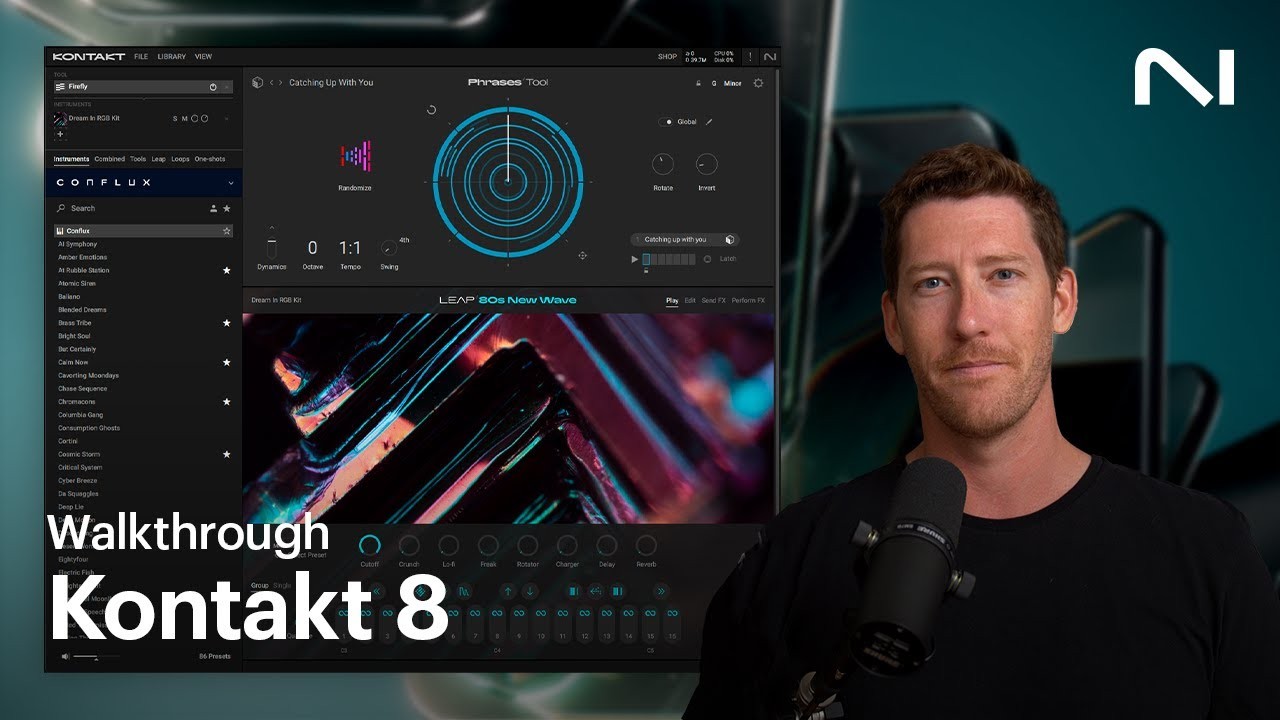
Kontakt 7 is an evolution, not a revolution. The core architecture — zone-based sample mapping, the KSP scripting layer, disk streaming — has been stable for years, and that stability is itself a feature. The meaningful additions since Kontakt 6 include a fully rebuilt Factory Library 2 (55+ GB of new content), a native Wavetable module, improved hi-DPI GUI rendering, and performance headroom improvements for sessions running large orchestral templates. None of these updates are dramatic on paper. All of them land in the right places.
The headline reason professionals choose Kontakt 7 over any alternative is the third-party library ecosystem. Spitfire Audio, EastWest, Output, Heavyocity, 8Dio, ProjectSAM — the most commercially significant orchestral and cinematic sample developers in the world have built their flagship products around Kontakt’s scripting layer. When a composer is hired for a TV series and the brief specifies “Kontakt-based mockup,” there’s no workaround. The platform’s universality in professional contexts is its own competitive moat.
Best for: Film and TV composers, orchestral producers, beatmakers managing large third-party library collections, and sound designers building custom instruments.
Core Features Breakdown
The KSP Scripting Engine — The ceiling no other sampler reaches
Kontakt Script Processor (KSP) is the defining technical feature of the full Kontakt license. It’s a proprietary scripting language built directly into the sampler engine, and it’s what allows third-party developers to create instruments that behave like sophisticated software products rather than static sample playback machines. Custom GUIs, round-robin randomization, velocity-sensitive articulation switching, legato detection, ensemble voicing logic — all of it is implemented through KSP.
For most users, you’ll never write a KSP script yourself. But you benefit every time you load a commercial library that does. Spitfire’s BBCSO, EastWest’s Hollywood Orchestra, and Heavyocity’s Damage percussion series all use KSP to deliver performance behaviors that the underlying samples alone couldn’t provide. The Player license blocks certain scripting capabilities, and non-authorized libraries time out in demo mode — two limitations that compound quickly in real production workflows.
The Sampling Engine — Built for scale, tuned for realism
Kontakt 7’s sample engine uses disk streaming by default: instruments load a minimal preload buffer into RAM and stream the rest off disk in real-time. This is what makes 600 GB orchestral libraries viable on workstations with 32 GB of RAM. The preload buffer size is adjustable per session, letting you balance latency sensitivity against memory headroom based on your hardware.
Time Machine Pro — Kontakt’s pitch-shifting and time-stretching algorithm — remains accurate for standard use cases. It’s not competing with AI-based tools like Melodyne 5 for complex melodic manipulation, but for realistic pitched sample playback within ±12 semitones it’s reliable and artifact-resistant. The Wavetable module, new in Kontakt 7, lets you convert any sample zone into a wavetable synthesis source and layer it alongside zone-based playback. In practice, this opens creative territory between traditional sampling and synthesis that Kontakt previously required workarounds to access.
Factory Library 2 — 55 GB exclusive to the full license
Factory Library 2 is locked behind the full Kontakt 7 purchase and is not available in Player. It contains over 1,000 instruments: acoustic pianos recorded with selectable mic positions, orchestral sections, world instruments, vintage drum kits, synthesized pads, and studio tools. The quality has improved measurably compared to the original factory content — particularly the acoustic piano, upright bass, and orchestral string sections, which are session-ready without additional layering or processing.
For producers who don’t yet own a curated commercial library, Factory Library 2 alone represents significant value. The gap between this content and the stock sample libraries bundled with most DAWs is substantial.
Free Alternatives to Kontakt 7
Decent Sampler — The best free sampler for community instruments
- Developer: Dave Hilowitz
- Price: Free
- Platforms: Windows, macOS, Linux
- Formats: VST3, AU, AAX, Standalone
Decent Sampler has built a legitimate ecosystem around a completely free and open-format sampler engine. The DecentSamples community library covers vintage upright pianos, choir pads, orchestral stabs, guitar samples, and hundreds of niche instruments — all free to download. The format itself is XML-based and readable, which means building your own custom instruments is genuinely approachable without any scripting background. The UI is intentionally minimal; you won’t find KSP-level behavior customization, but for the price point (free), the quality-to-effort ratio is outstanding.
Best for: Producers on a zero budget who want studio-quality community instruments.
→ Download Decent Sampler Free
UVI Workstation — Feature-rich free playback for the UVI ecosystem
- Developer: UVI
- Price: Free
- Platforms: Windows, macOS
- Formats: VST3, AU, AAX, Standalone
UVI Workstation is the free host engine for UVI’s commercial library catalog, including Falcon expansions, the IRCAM Solo Instruments collection, and the Synth Anthology series. As a standalone sampler for custom use it’s more limited than Decent Sampler — access to free content is narrower. But the engine itself is technically impressive: multi-timbral, low-latency, with a built-in arpeggiator and chord module. For producers evaluating whether to invest in the UVI or NI ecosystem, running UVI Workstation with demo libraries is a useful comparison exercise before committing either way.
Best for: UVI library owners; producers comparing ecosystem options before a major purchase.
→ Download UVI Workstation Free
Kontakt Player — The free gateway to the Kontakt ecosystem
- Developer: Native Instruments
- Price: Free
- Platforms: Windows 10/11, macOS 12+
- Formats: VST3, AU, AAX, Standalone
Kontakt Player is the free runtime for Kontakt-format instruments. When a developer has gone through NI’s certification process to designate their library as “Player-compatible,” it runs without restriction in the free version — no time limit. Spitfire LABS, many Output instruments, and select Heavyocity releases fall into this category. The limitation is real: non-certified libraries cut out after 15 minutes per session, which makes extended composition work impossible. For producers whose entire library is Player-certified, the free tier is a legitimate long-term choice. For anyone who owns or plans to own non-certified third-party content, it’s a waiting room.
Best for: Producers who exclusively use Player-certified libraries and don’t need KSP scripting access.
→ Download Kontakt Player Free
Worth Upgrading To (Paid Options)
Kontakt 7 — Unlock the full platform with no restrictions
- Developer: Native Instruments
- Price: $449; upgrade from $99 for existing Kontakt 6 or older owners
- Why upgrade: The 15-minute demo lock in Player is unworkable for real production sessions involving non-certified libraries — a category that includes most commercially significant orchestral and cinematic instruments. The full license removes that restriction permanently, adds the complete Factory Library 2 (55+ GB of exclusive content), activates the Wavetable synthesis module, and enables unrestricted KSP scripting and custom instrument building.
Komplete 15 (Native Instruments) — The most efficient route to a complete studio
- Developer: Native Instruments
- Price: From $599 (Standard) to $1,499 (Ultimate Collector’s Edition)
- Why upgrade: Komplete 15 bundles Kontakt 7 with over 150 instruments, effects, and expansions — including Massive X, Battery 4, Reaktor 6, Guitar Rig 7, and a curated selection of premium orchestral Kontakt libraries. If you need Kontakt 7 and even two or three of those additional tools, the bundle math is usually conclusive. The Standard edition alone covers synthesizers, drums, mixing effects, and sampled instruments that would cost multiples of the bundle price if purchased separately.
Full Comparison Table
| Plugin | Price | Type | Highlights | CTA |
|---|---|---|---|---|
| Kontakt Player | Free | Sampler Host | Runs certified libraries, no time limit for authorized content | Get Free |
| Decent Sampler | Free | Sampler | Open format, Linux support, active community library | Get Free |
| UVI Workstation | Free | Sampler Host | Multi-timbral, arpeggiator, UVI ecosystem access | Get Free |
| Kontakt 7 | $449 | Full Sampler | KSP scripting, Factory Library 2, Wavetable module, no demo limits | Get It |
| Komplete 15 Standard | From $599 | Bundle | Kontakt 7 + 150+ instruments, synthesizers, drums, FX | Get It |
How to Choose
- If your entire library is Player-certified (Spitfire LABS, certain free NI content), Kontakt Player covers everything you need at zero cost — do not pay for the upgrade unless your workflow changes.
- If you own or plan to buy non-certified third-party libraries (8Dio, ProjectSAM, older EastWest Kontakt content), the 15-minute lock in Player makes the full license non-negotiable — there is no workaround.
- If you’re building a studio from scratch and need more than just a sampler, Komplete 15 Standard is almost always better value than buying Kontakt 7 alone — the bundled synthesizers and mixing tools would cost significantly more individually.
- If budget is a hard constraint, Decent Sampler’s community ecosystem covers piano, choir, folk, and ambient territory with real quality — it’s not a compromise if those sounds fit your genre.
- If you compose for picture, games, or media, Kontakt 7 is effectively the industry standard. Most orchestral developers target the Kontakt engine exclusively, and many professional briefs implicitly require it.
FAQ
Is Kontakt 7 worth $449 in 2026? For producers working with large third-party orchestral or cinematic libraries, yes — the full license removes the 15-minute Player lock, adds 55+ GB of exclusive content, and enables the scripting capabilities that power commercial instrument libraries. For casual users, the free Player tier covers most needs without spending anything.
What is the actual difference between Kontakt 7 and Kontakt Player? Kontakt Player is free but applies a 15-minute demo timeout to any library that NI hasn’t certified for Player use. Kontakt 7 (full license) removes that restriction entirely, unlocks Factory Library 2, enables the Wavetable module, and grants full KSP scripting access for building or editing instruments.
Can I use Spitfire Audio without buying Kontakt 7? It depends on the specific library. Spitfire’s LABS series and several commercial titles are Player-certified, meaning they run without the time limit in the free version. However, some Spitfire libraries and most other third-party orchestral content is not certified and will time out in Player — requiring the full license for production use.
How does Kontakt 7 compare to UVI Falcon 3 or HALion 7 in 2026? Falcon 3 has a more flexible synthesis architecture and deeper modulation routing — it suits producers building hybrid synth-sampler instruments from scratch. HALion 7 integrates tightly with Cubase and offers strong scoring workflow features. Kontakt 7’s competitive advantage is its third-party library ecosystem: no other platform has equivalent breadth of developer support, which is the deciding factor for most professional composers.
Does Kontakt 7 run natively on Apple Silicon? Yes. Native Instruments added full Apple Silicon native support (no Rosetta 2 bridge) for Kontakt 7. Performance on M2, M3, and M4 Macs with large orchestral session templates is substantially better than on equivalent Intel machines, particularly in terms of disk streaming headroom and low-latency responsiveness.
Related Guides
- 10 Best Free Bass Synth VST Plugins in 2026 — Ranked
- 12 Best Vintage Synth VST Emulations in 2026, Ranked (Moog, Roland, Oberheim)
- 10 Best Compressor Plugins for Drums in 2026 — Ranked
- 8 Best Free Choir & Vocal Ensemble VST Plugins in 2026 — Ranked
- 10 Best Free Drum Machine & Beat VST Plugins in 2026 — Ranked
Final Thoughts
Kontakt 7 is not the most exciting plugin you can buy in 2026, but it is likely the most consequential. The library ecosystem it anchors, the scripting depth it enables, and the professional workflow it supports have no equivalent at any price — and the free Player tier is a genuinely useful entry point for producers who want to test the waters before committing. When you’re ready to remove the limitations and access the full platform, start with Kontakt 7, and seriously evaluate Komplete 15 if you need synthesizers and effects alongside it.
→ Get Kontakt 7 — Official Site
This post contains affiliate links. We may earn a small commission at no extra cost to you.
This post contains affiliate links. We may earn a small commission at no extra cost to you.